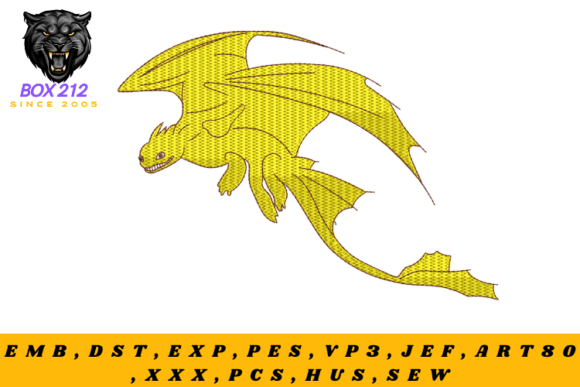
Dragon Digital Embroidery Design
A Mythical Design That Demands Intentional Execution
As an embroidery designer who’s stitched over 300 commercial orders—from boutique baby blankets to Etsy bestsellers—I approached the Dragon Digital Embroidery Design with equal parts excitement and caution. It lives in the Fairy Tales category, but this isn’t a whimsical cartoon dragon—it’s a commanding, scale-textured creature with coiled posture, layered wings, and eyes that seem to follow you across the hoop. The first impression? This is a design with presence. It leans into drama, not decoration. That means it won’t fade into the background of a tote bag or get lost on a sweatshirt front—it’ll anchor the entire piece.
Where This Dragon Fits Best (and Where It Doesn’t)
The Dragon Digital Embroidery Design thrives where storytelling meets surface stability. I tested it on a medium-weight cotton twill apron and a 100% combed cotton kitchen towel—both held detail beautifully. On dense, stable fabrics like these, the satin stitch contours of the dragon’s jaw and the fill stitch gradients in its wing membranes read cleanly. It also translated well onto a structured cotton-polyester cap—but only when hooped with medium tear-away stabilizer and stitched at reduced speed. On stretchy fabric like lightweight jersey or ribbed knit, however, the same design pulled and distorted mid-stitch, especially around the curved spine and claw details. So while it *can* go on custom apparel, it’s not ideal for soft tees or baby onesies unless heavily stabilized and resized down.
This design shines brightest as a centerpiece: a large embroidered patch sewn onto a denim jacket, a focal motif on a linen pillow cover, or a bold statement on a canvas tote bag. It’s less effective as a subtle accent—say, a tiny dragon on a baby blanket corner—because its strength lies in scale and contrast. For nursery decor or handmade gifts, consider pairing it with simple monograms or neutral borders to let the dragon breathe.
Real-World Performance Notes You Can’t Skip
- Hoop size matters: The full design requires a minimum 5” x 7” hoop. Smaller hoops mean cropping or significant resizing—which risks losing fine line work in the scales and wing veins. Always confirm the actual hoop requirement on the Creative Fabrica product page before committing to a project.
- Stitch density is intentional—not excessive: There are no gratuitous fills. Areas like the dragon’s chest use strategic satin stitch bands, while the tail relies on precise running stitch outlines. That said, dense zones (especially under the wing joints) benefit from cutaway stabilizer on lightweight or textured fabric.
- Thread color contrast is non-negotiable: On dark fabric, I switched to high-sheen rayon thread in metallic gold and deep emerald to preserve definition. On light fabric, matte cotton thread gave cleaner texture. Avoid low-contrast combos—this design needs visual hierarchy to read.
- Curved surfaces demand testing: Caps and curved pillow edges required re-hooping and slight digitization tweaks (like shortening jump stitches). Don’t assume plug-and-play compatibility—always run a test on scrap first.
How It Elevates Your Handmade Product—and When It Might Undercut Trust
When executed well, the Dragon Digital Embroidery Design transforms a generic item into a personalized gift or boutique-ready piece. Customers notice craftsmanship: the deliberate layering of wing membranes, the crispness of claw definition, the way light catches the satin stitch ridges. That perception directly supports higher pricing, stronger brand consistency, and better product photography—especially against clean backdrops where the dragon’s silhouette reads instantly.
But here’s the honest part: if stitched hastily on unstable fabric or with mismatched stabilizer, the same design highlights flaws. Loose threads in dense fill areas, puckering along the spine, or blurred eye detail can erode buyer trust faster than a simpler motif would. For Etsy sellers or craft fair vendors, that means the Dragon Digital Embroidery Design rewards preparation—and punishes improvisation.
Smart Integration for Commercial Embroidery & Digital Sellers
If you sell digital embroidery files or printable mockups, this design adds strong thematic value to your design assets library—especially alongside other Fairy Tales-inspired motifs. Its mood pairs naturally with forest-themed fonts or parchment-style layout templates. For apparel decorators offering custom embroidery, position it as a premium upgrade: “Mythical Detail Add-On” rather than just another machine embroidery design.
For small business owners building cohesive collections—say, a “Legend Series” of embroidered kitchen towels or nursery pillows—the Dragon Digital Embroidery Design serves as a hero piece. Pair it with coordinating elements (a simplified dragon-scale border, a single claw icon) to reinforce brand recognition without repeating the full motif.
Before You Stitch: Five Non-Negotiable Checks
- Run a test on scrap fabric matching your final product’s weight and weave—even if it’s just one wing section.
- Compare how the design looks stitched on both light and dark fabric swatches; adjust thread colors accordingly.
- Verify file formats included (DST, PES, JEF, etc.) and confirm compatibility with your embroidery machine model.
- Review licensing terms on the Creative Fabrica product page—especially if planning to sell finished items commercially.
- Inspect small details post-stitch: Are wing tips sharp? Do scale lines remain distinct? If not, revisit stabilizer choice or stitching speed.
In short, the Dragon Digital Embroidery Design isn’t filler—it’s a statement. It asks for thoughtful material selection, deliberate stabilization, and respect for its scale. Used with intention, it elevates your handmade product, strengthens customer connection, and stands out in crowded marketplaces. Used carelessly, it becomes a reminder of why preparation matters more than pixel-perfect previews. Whether you’re designing for Etsy, crafting seasonal gifts, or expanding your commercial embroidery offerings—this dragon earns its place. Just make sure your process is ready to match its energy.